If you live in Toronto, you know that we had a terrible storm on September 2, 2026, which resulted in over 100 mm of rain in parts of the city. Flash flooding left many drivers stranded on the Don Valley Parkway while the storm knocked down trees and power lines. Hopefully, you were not one of the 65,000 Toronto residents left without hydro. Extreme weather events such as the aforementioned storm, which seem to be happening more often are a valid reason for ensuring your home has backup power such as the new Jackery HomePower 1000 Plus Solar Generator. [Disclosure: I was provided with a complimentary Jackery HomePower 1000 Plus Solar Generator to review for this article.]
INSERT PHOTO OF JACKERY
The Jackery HomePower 1000 Plus is a compact portable generator whose dimensions are 12.4″ x 7.9″ x 9.2″. It weighs 23.8 pounds so is fairly easy to carry.
How Much Power Can Jackery HomePower 1000 Plus Provide to Devices and Appliances?
This portable power station has a capacity of 1024 Wh, which means when the Jackery HomePower 1000 Plus is fully charged it can provide:
- A 100-watt device such as a lamp; large LED TV; laptop; several LED lights; electric blanket on low setting: power for about 10 hours
- A 200-watt device such as a larger LED TV + internet equipment; small slow cooker; older refrigerator; several lights and electronics together: power for about 5 hours
- A 500-watt device such as a small space heater on low; blender; small coffee maker; desktop computer and monitor: power for about 2 hours
- A 1,000 watt device such as a microwave on a lower setting; toaster; coffee maker; small space heater; hair dryer on a lower setting: power for about 1 hour.
Keep in mind that heating devices consume electricity very quickly so the Jackery HomePower 1000 Plus would last much longer powering a refrigerator; Wi-Fi router; phones; and a few LED lights versus heating appliances such as a space heater; toaster; or kettle.
Jackery HomePower 1000 Plus has an output of 1800W, which means you can plug it in to appliances that when combined are drawing up to a maximum of 1,800 watts at the same time. For example, you could plug in a 1,000 W microwave; a 500 W coffee maker and a 200 W TV, which equals 1,700 W into the Jackery HomePower 1000 Plus at the same time. Of course, running close to 1,800 W in appliances means you will drain the Jackery HomePower 1000 Plus battery quicker.
How To Charge the Jackery HomePower 1000 Plus Solar Generator
Since I did not receive the Jackery SolarSaga panels, I charged the Jackery HomePower 1000 Plus by plugging it into my wall outlet. The Jackery HomePower 1000 Plus was already charged to 29% when I received it. To charge it to 100%, it took me 85 minutes.
- Wall Outlet: Plug it into a wall outlet. The digital display will show when it’s charged to 100%;
- Solar Panels: Connect compatible Jackery SolarSaga panels to the DC/solar input to charge;
- Vehicle Charging – If your vehicle has a 12V accessory socket (cigarette-lighter outlet), you can charge your Jackery HomePower 1000 Plus Solar Generator in your car. You must keep your vehicle running while charging the Jackery HomePower 1000 Plus or you could drain your vehicle’s starter battery. This process is much slower than plugging the Jackery HomePower 1000 Plus into a wall outlet.
Once it was 100% charged, I was eager to use it to charge my Samsung Galaxy S25 phone.
Jackery HomePower 1000 Plus has three USB ports:
- 1 x USB – A – up to 18W
- 1 x USB – C – up to 30W
- 1 x USB – C – up to 100W
There are also two electrical plugs: AC1 and AC2 electrical outlets for plugging in appliances.
I plugged my phone into the USB – C port that has up to 100W. My phone was down to a 75% charge and it took 42 minutes to charge it to 100%.
I also tested it on my HP Laptop, whose battery was at 50%. Again, I plugged my laptop into the USB – C port that has up to 100W. Jackery HomePower 1000 Plus charged my phone to 100% in 78 minutes.
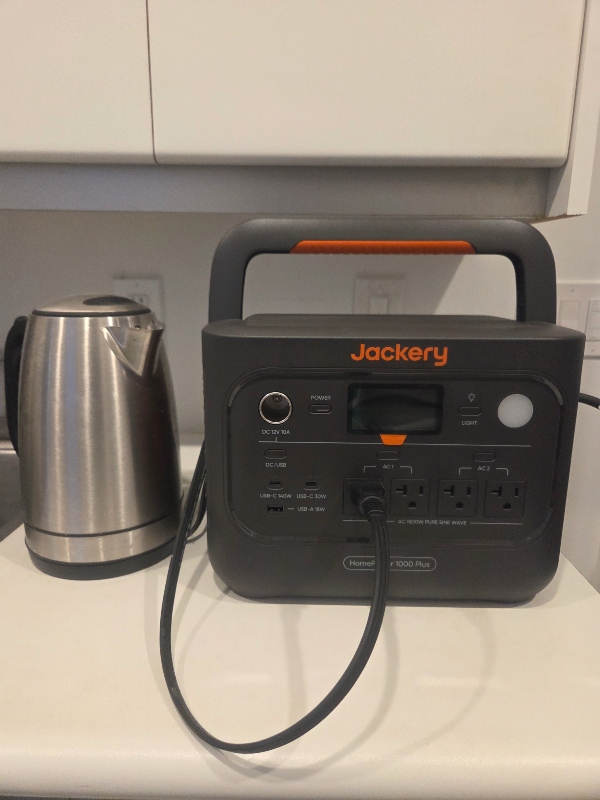
In a power outage, especially one that lasts less than two hours, my phone and laptop are some of the most important items for me to have charged since I work from home. Of course, lighting would also be an issue so I tried plugging one of our lamps into one of the AC outlets on the Jackery HomePower 1000 Plus. I then turned on the AC output. The display for the AC output shows how many watts the lamp is using. This is very helpful if you are using the AC output to plug in your refrigerator, which is one of the higher priorities during a longer power outage to prevent food spoilage. If you are plugging in your refrigerator, you should refrain from plugging in your kettle, toaster or space heater since they will drain the battery much faster.
If you have a property in cottage country, you know that power outages are more frequent due to dense forests creating havoc when storms thrash branches on to power lines. And power outages are often longer since it can take hydro crews longer to access the damage.
Other handy uses for the Jackery HomePower 1000 Plus Solar Generator include powering outdoor lawn devices when you don’t have an electrical outlet nearby, but do not leave the Jackery HomePower 1000 Plus outside because if it gets wet, it could result in an electric shock hazard. Always keep the unit dry under, for example, a covered porch, in a garage or shed.
I’m so glad we now have the Jackery HomePower 1000 Plus Solar Generator. It puts my mind at rest knowing that when we have our next power outage, we won’t be fumbling in the dark and we’ll be able to stay in touch with family and receive news updates with working internet and cellphones, as well as keep our food supply from going bad!
You may be interested in reading, “Where to Eat and Drink in Toronto During TIFF 2026“